Hebrew, Arabic and Persian PDF to Word,
true to the original
Prompt injection protection
- AhsanPDF is an exclusive development, combined with scanning and correction tools among the most advanced, including NLP models and other models trained independently, and is made especially for Arabic, alongside Hebrew.
- It extracts text from documents that are not naturally editable (scans, photos and PDFs) and turns it into fully editable Word and Excel files, keeping the original's layout, digits and tables.
- Text extraction and document writing run entirely on our own servers, without relying on any third-party service.
Laws, budgets, contracts and court rulings in Hebrew, Arabic and Persian (beta): PDFs, scans or images. One Word page for every page of the original, and you also get an Excel file: the tables with sums you can calculate, and the text by page number.
- Hebrew, Arabic and Persian (beta)
- Up to 80MB
- Free during the trial
- Files are deleted within half an hour (24 hours if you asked to keep them)
A document of a few dozen pages takes about a minute to a few minutes. You can leave the tab open.
All pages are selected for conversion. You can unselect pages that do not need converting, for example pages with drawings, diagrams or pictures. A page you do not select stays in the file as a page with a short note, so the page numbering is kept.
- From one upload: a Word file and an Excel file
- A word the recognition is unsure of gets a comment and is never changed silently
- Every correction appears as a tracked change you can accept or reject
- Files are deleted from the server when you move on to the next file, or within half an hour (24 hours if you asked to keep them in your personal area)
- You can also split or merge PDFs: pick pages or add files, and download one PDF
The page keeps its original design,
specializing in Hebrew & Arabic
The side column, centered headings, footnotes and the printed page number, each in its place.
Word and Excel from one upload
The page in its original layout, and the tables also as a sheet, with sums as numbers and brackets kept.
Every correction is marked and awaits your approval
In full transparency, to keep the document authentic: every correction is a tracked change, and every doubt is marked in yellow with a comment.
Prompt injection protection
In today's world, using an agent system for a seemingly simple task such as extracting text from a PDF can put your whole system at risk and cause real grief. At AhsanPDF we added a feature that answers exactly this threat, so you can have peace of mind when the conversion runs with us, and your agents never receive contaminated or hidden text.
See it work
A 359-page law, from PDF to Word
We uploaded the whole Jordanian Civil Law and converted it to Word and Excel. The wait is sped up in the video, and the clock shows real time.
Examples from real documents
The original next to the result
Pages from real Hebrew and Arabic documents (a budget table, law books), as they opened in Word. In each example the original comes first, then the file you receive.
- Original · PDF
- Result · Word
- Tables · Excel
From the same conversion you get both Word and Excel, at no extra charge.
- The columns are taken from the lines on the page
- Row heights and centered headings are kept
- The total rows stay bold
- The amounts are numbers you can add up, and the code is separate from the description
- A last column shows which page of the original each row came from
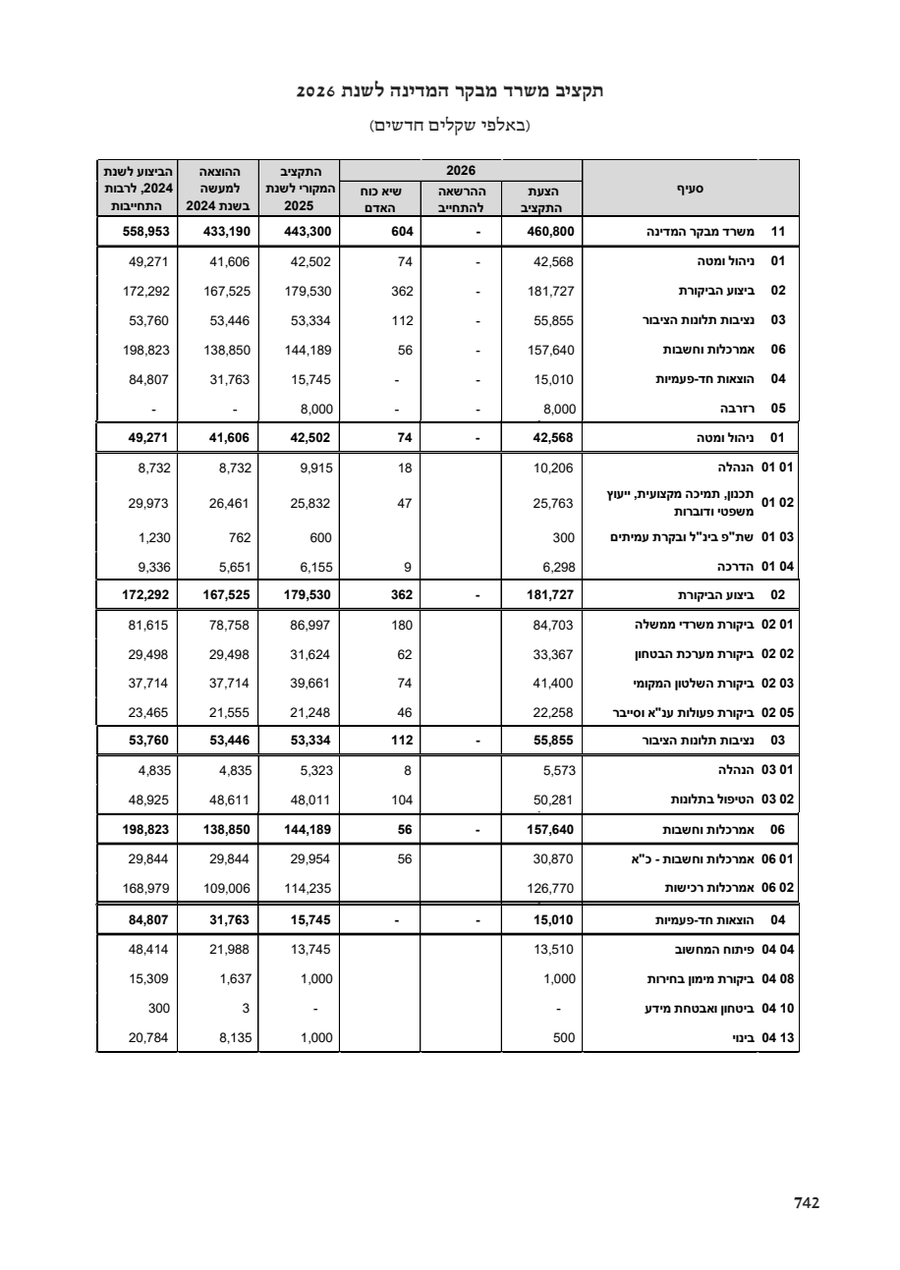
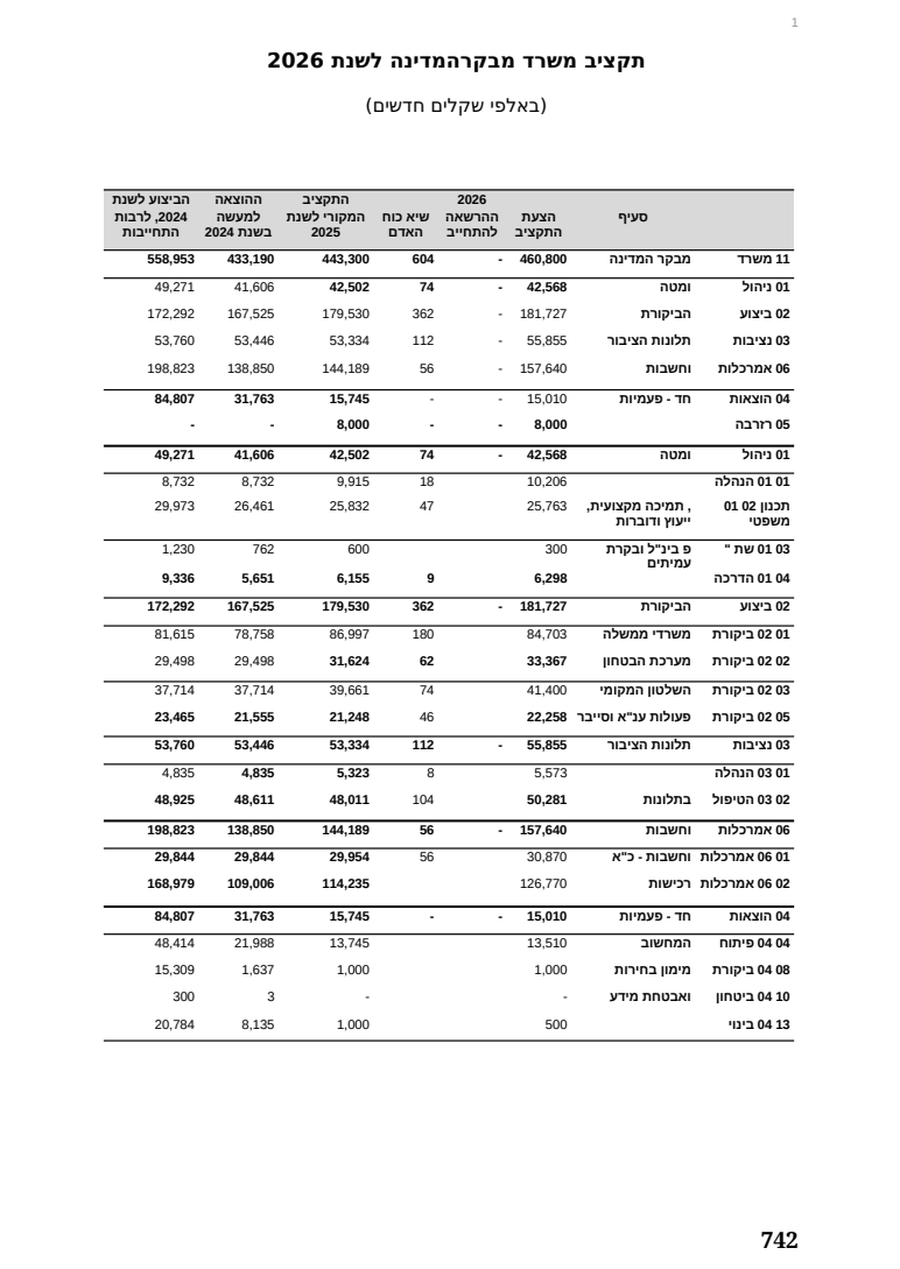
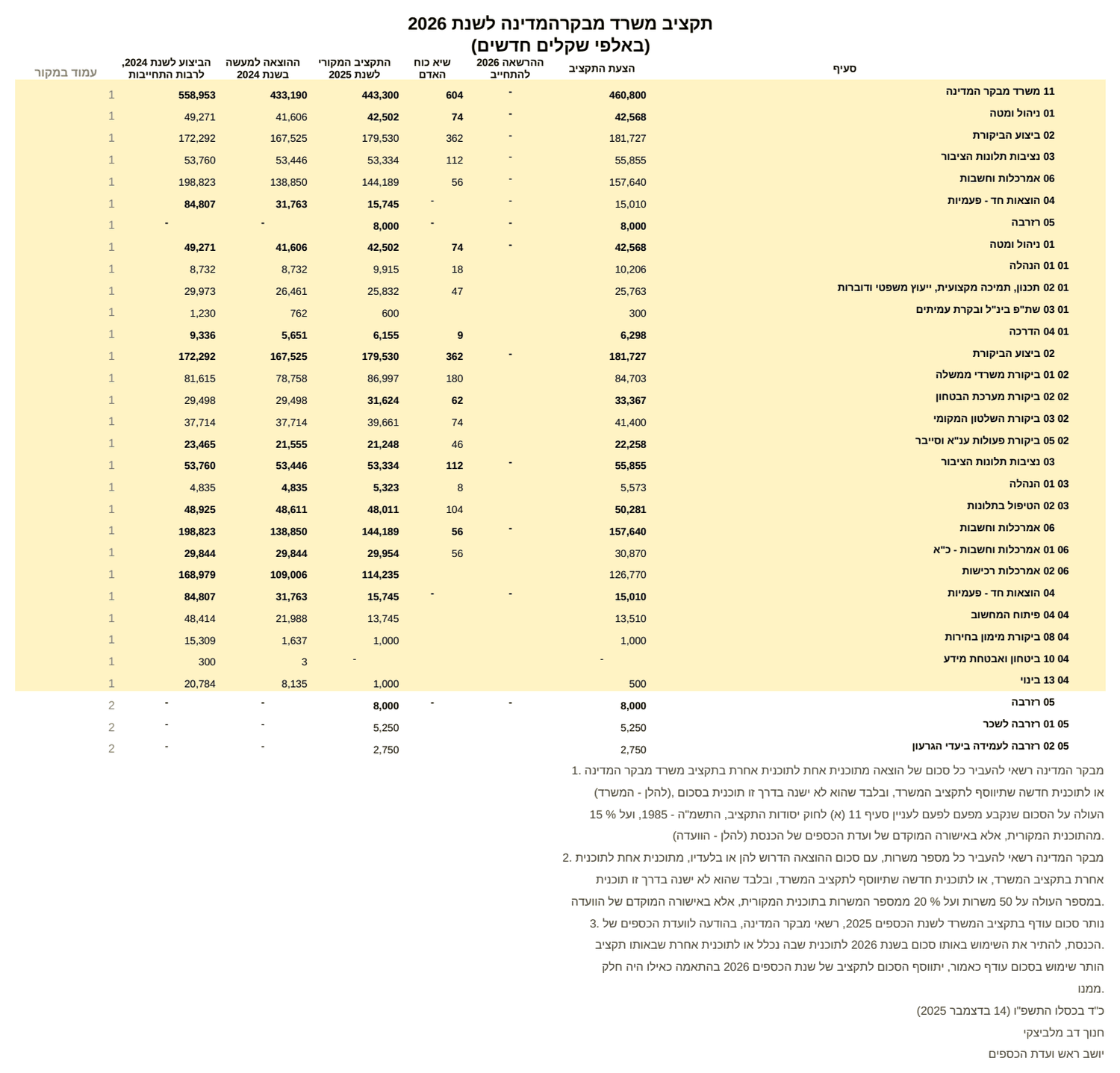
The numbers, the headings and the notes under the table stay readable.
- The footnote marks (* ** ***) are kept
- The sum at the end of the first note stays
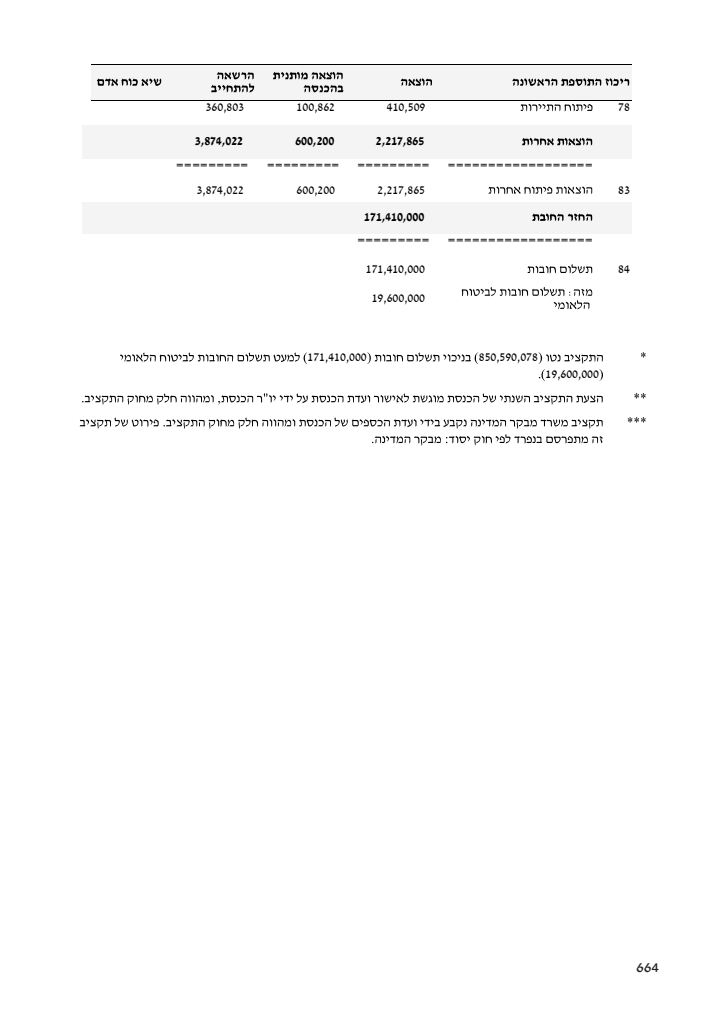
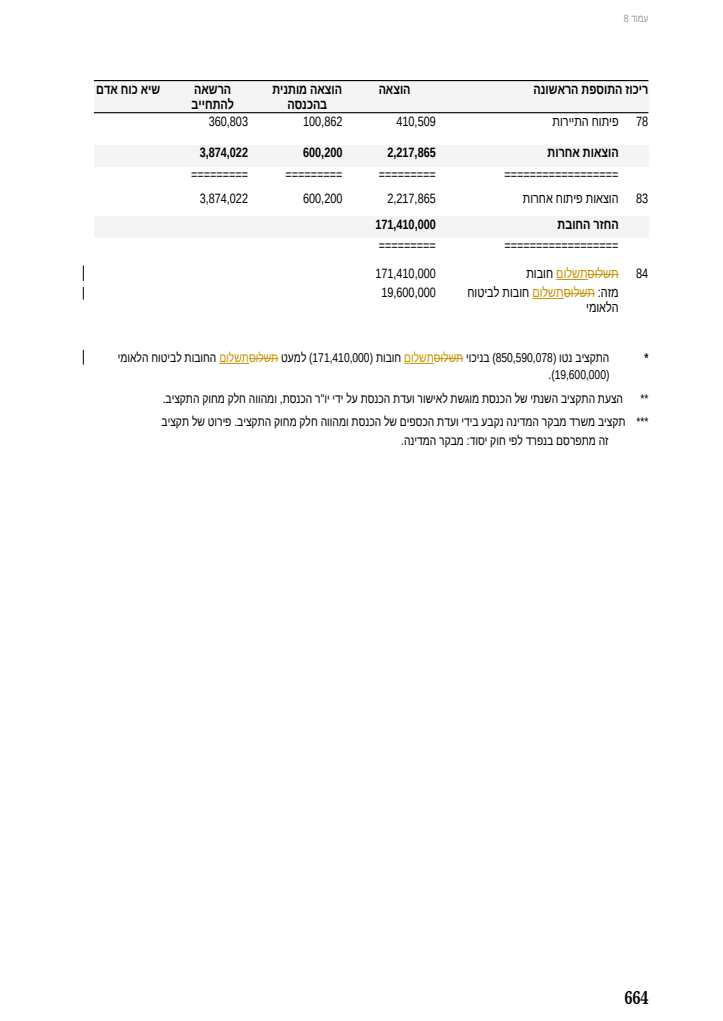
The margin notes stay in a column of their own beside the section.
- A note number that was misread (149 instead of [49]) is corrected as a tracked change
- The line in the margin shows where
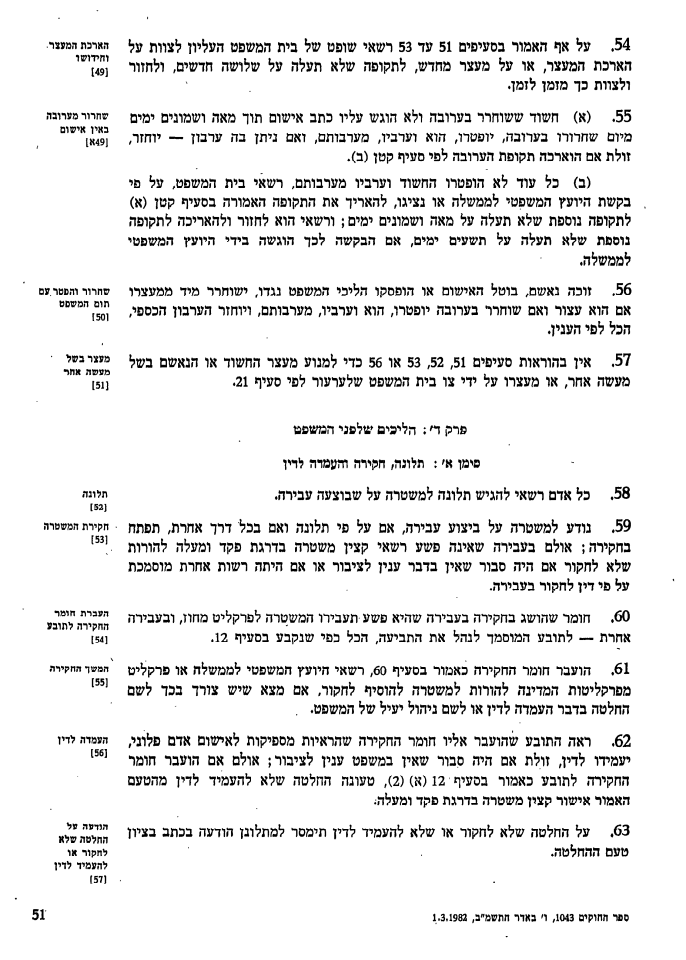
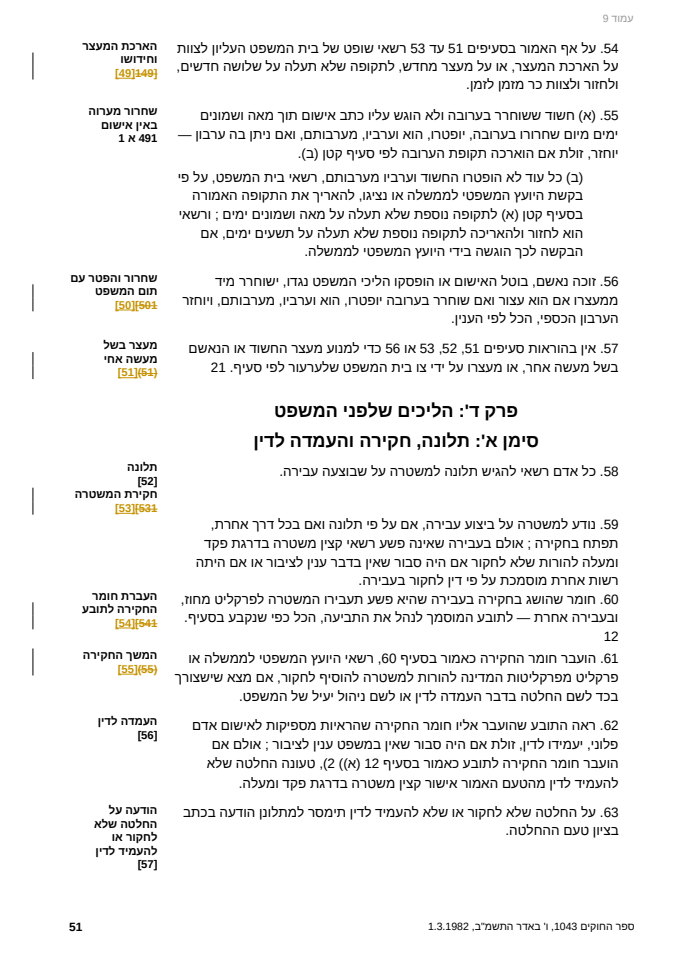
Article numbers, clauses and headings stay in place and at their size.The comparison checks words, not order, and a digital document has no recognition errors to flag.
- Long sentences and numbered clauses as in the original
- In an automatic comparison of the Jordanian Civil Law (359 pages), about 99.7% of the words in the PDF are also found in the Word file
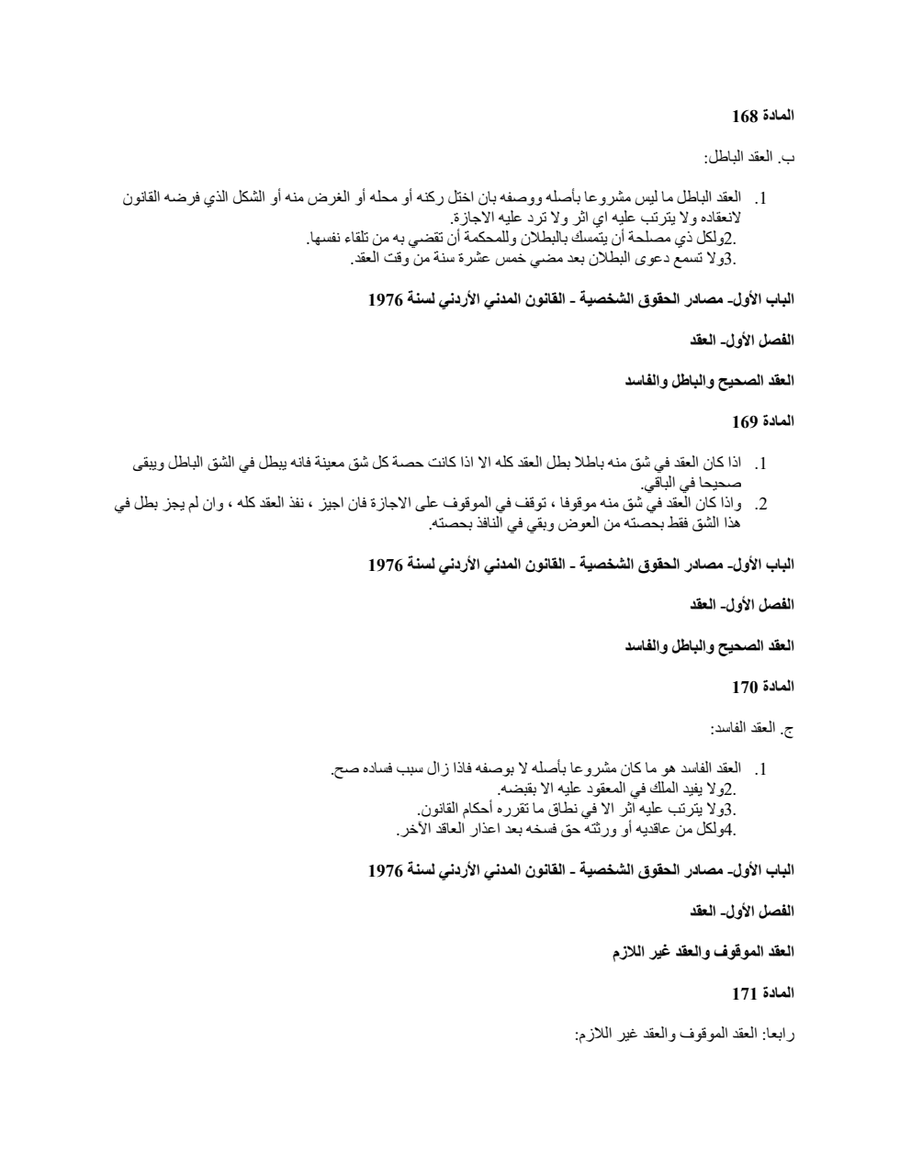
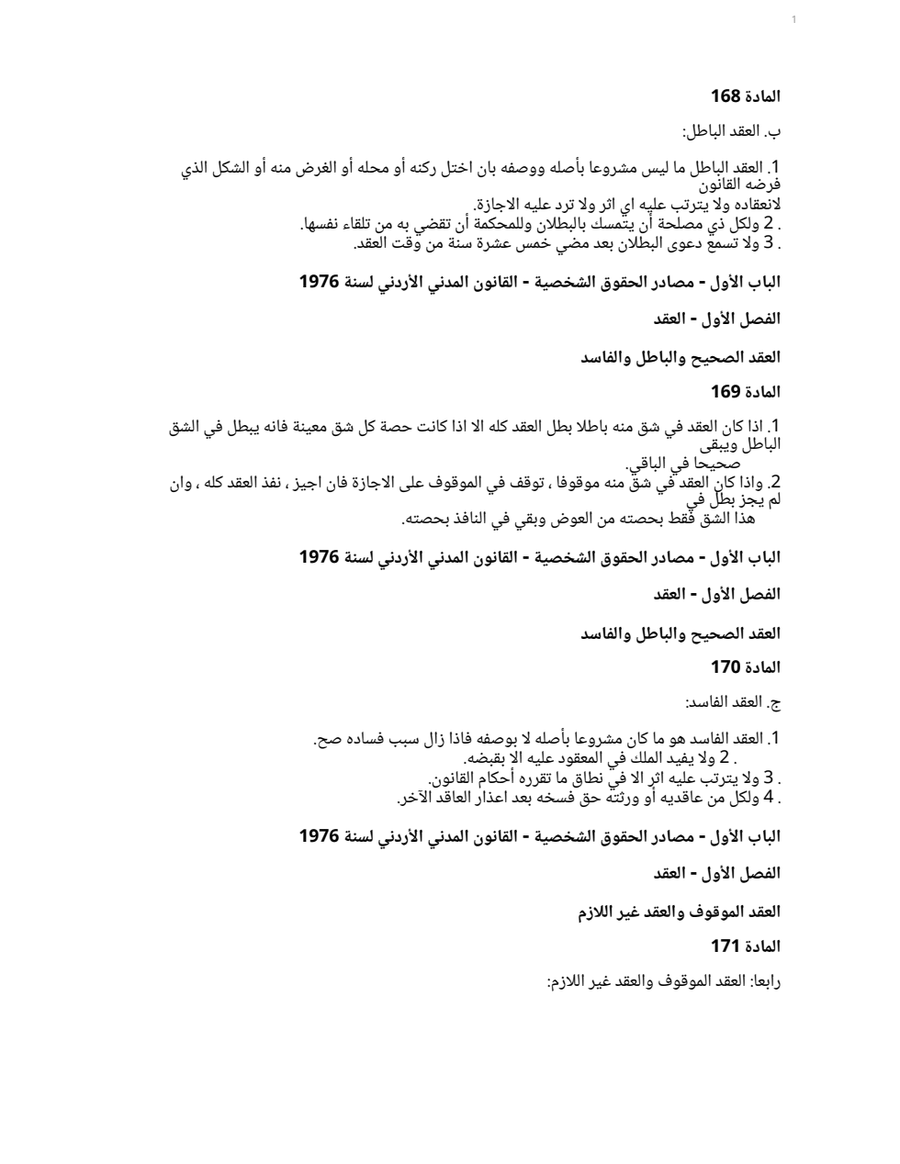
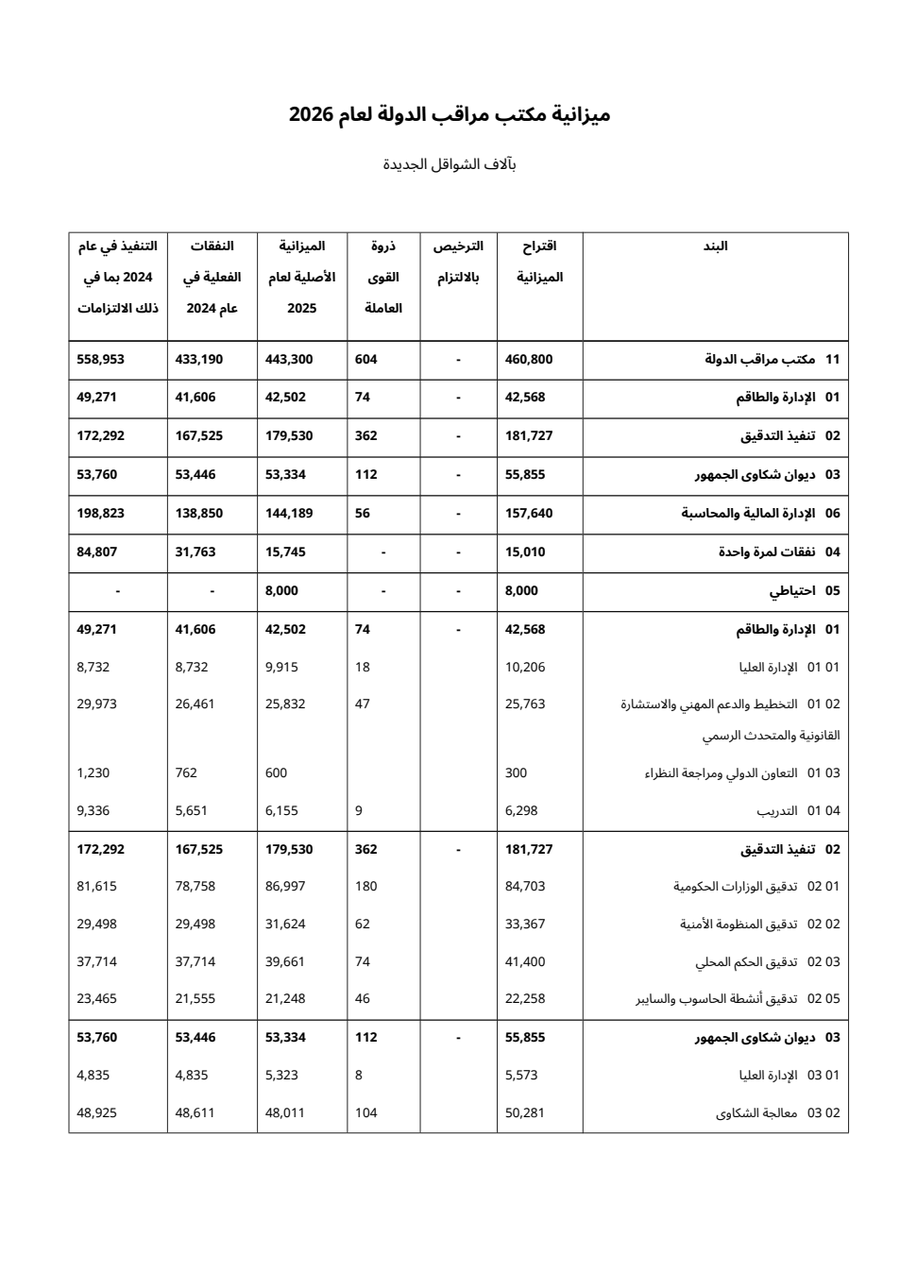
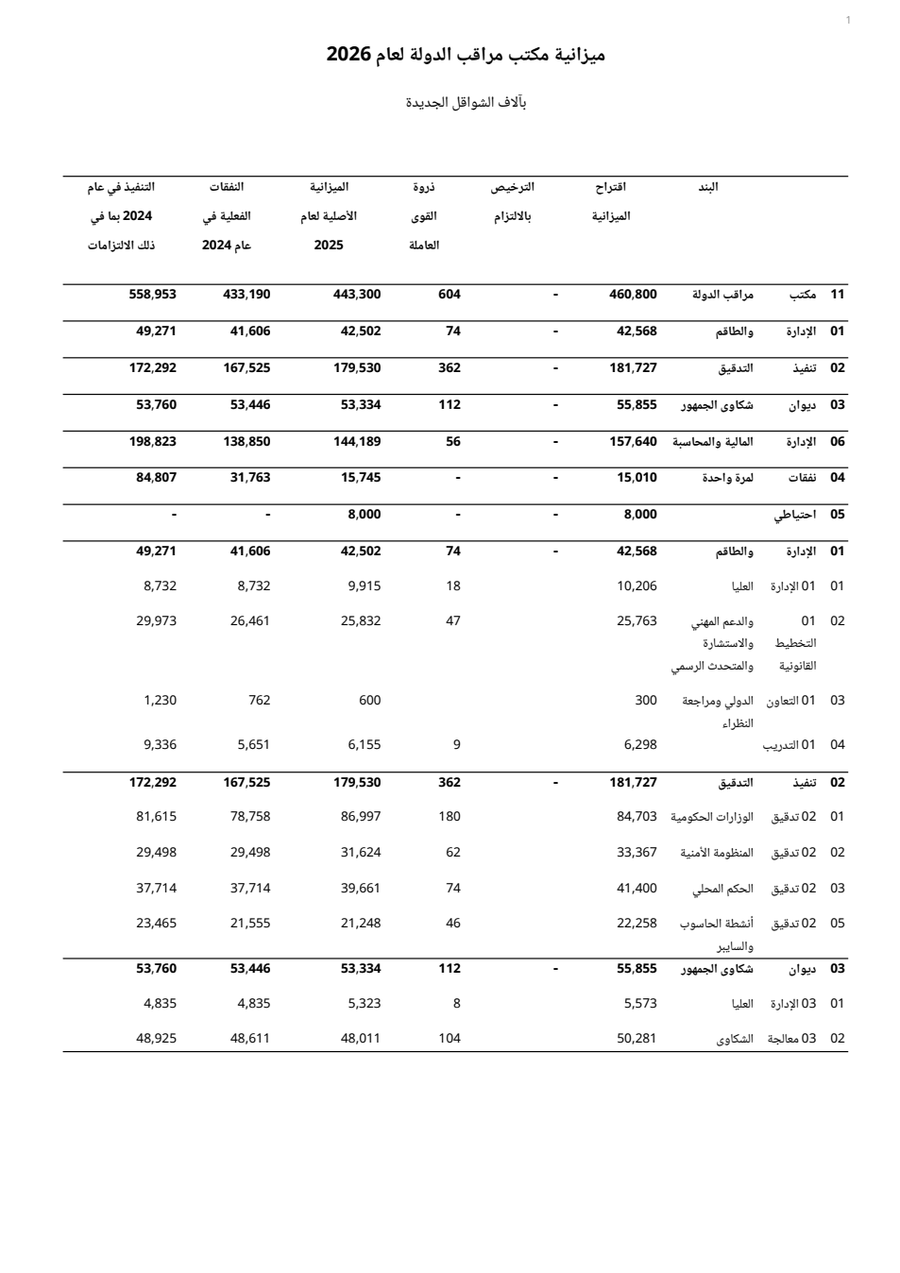
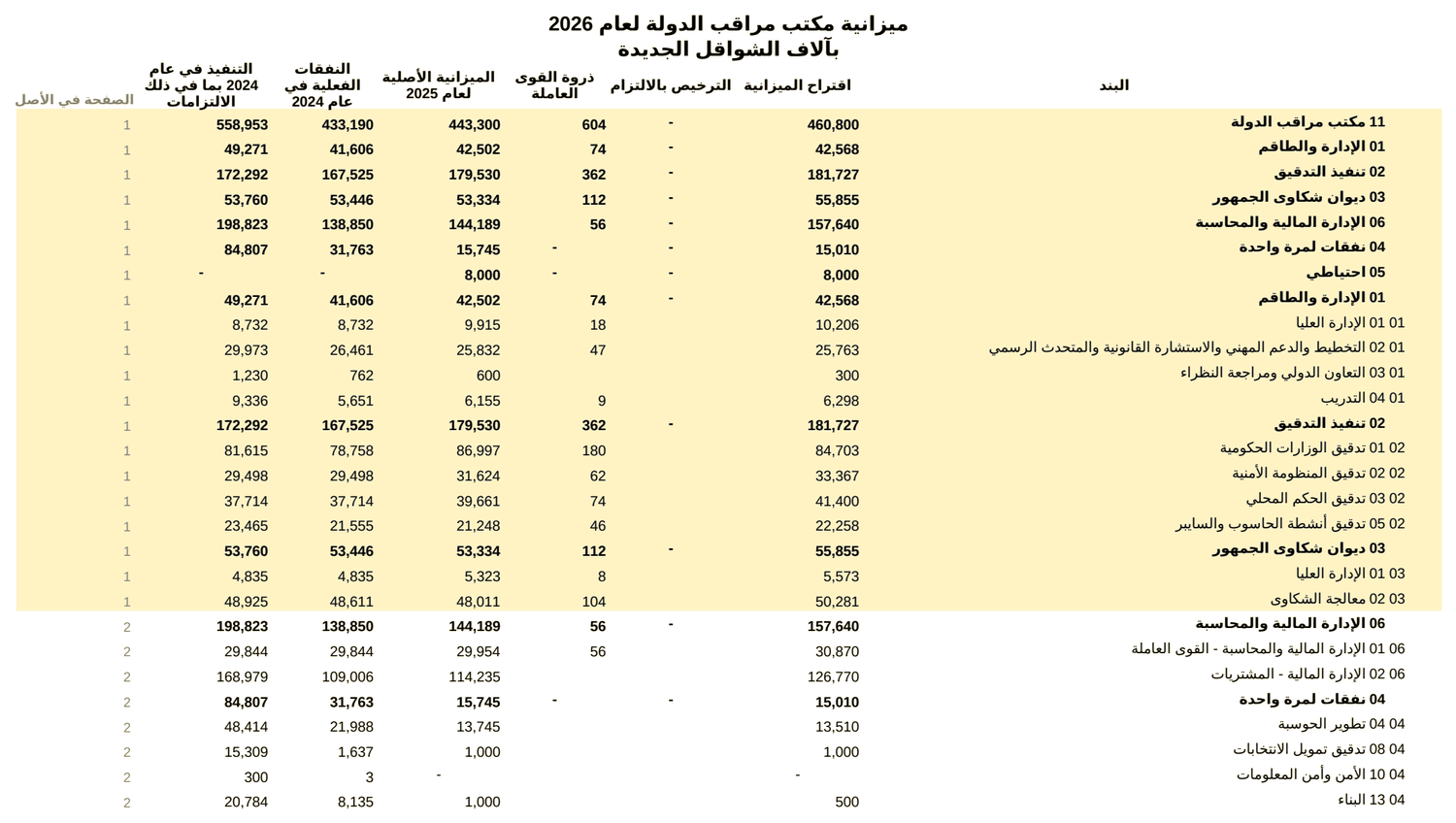
From the same conversion you get both Word and Excel, at no extra charge.A test document we prepared with real budget figures.
- The columns, the bold total rows and the column headings stay in place
- Each column has one heading, and the amounts are numbers you can add up
- The code is separate from the description
- A last column shows which page of the original each row came from
Error check
A recognition error never disappears silently
In scans and in labels saved as pictures, recognition occasionally makes a mistake. Every change and every doubt is marked inside the document, table cells included, so whoever receives it can check.

- A correction with proof. A word is corrected when the structure of the document, or a closed choice between two letters, proves the correction (for example a final ם read as ס, repeated through a whole document). Every correction is a suggested change: a red line in the Word margin, click it to see what changed.
- A doubt is marked. A word that may not be right gets a highlight and a comment, with no change. If there is nothing to add, there is no comment.
- A report at the end. A summary page with all the corrections and marks, by page.
Straight talk
What to know before you upload
Graphic documents
Marketing brochures, presentations, diagrams and illustrations are not what the system is built for. When you upload a PDF you can unselect such pages and convert only the rest.
Scans and photos
Reading quality depends on the quality of the image. A clear scan and a straight photo are read well, and every doubt is marked. An important document should be checked against the original.
Write to us
Tell us what you think
Write to us below if you have ideas for improvement. We promise to take every comment and remark of yours seriously. Only we read it.
Frequently asked questions
Which files are suitable?
PDFs or images (JPG, PNG, HEIC) in Hebrew, Arabic or Persian (beta): digital documents, scans and images. A file in another language, or a PDF whose text is reversed, is rejected with a message.
Can I also split or merge PDFs?
Yes, without converting to Word or Excel. After uploading, tick the pages you want and press "Download PDF of the selected pages": you get a short PDF of just those. You can also add files and photos and get one PDF of all of them, and photos stay in colour. A file made from a photo is a picture, not text you can search.
What is the difference between Hebrew and Arabic?
In both languages the layout and the text are kept, and the tables also become an Excel sheet. In Hebrew there is a full error check: corrections as tracked changes and comments on doubts. In Arabic the check works the same way: words the recognition is unsure of, or that look like another letter, are marked in yellow with a comment in Arabic, and a correction is made only when the system finds proof for it in the document itself. A digital document in Arabic is kept as it is, and Eastern and Western digits stay as they were in the original.
Is the result completely identical to the original?
The system is very accurate: it uses advanced tools and keeps strictly to the authenticity of the text, the layout, the tables and the numbers. There are situations in which reading is not perfect, mainly when the scan quality is poor or the photo is crooked. That is why there is a correction and marking system, which makes fixing easy while keeping the original: every correction appears as a tracked change you can accept or reject, and every doubt is marked, not deleted.
Is it safe to let an AI agent read the converted file?
A document can carry text meant for a machine and not for a person: white or tiny letters, text outside the page, invisible characters, or a plain sentence such as "ignore your previous instructions". When a digital PDF is converted, text that is in the file but not drawn on the page stays out of the Word file and is reported, invisible characters are removed, and sentences that read like orders to an agent are marked yellow. You can also download a plain-text version for an agent, in which such sentences are replaced by a marker and which opens with a note that the content is data from the document, not instructions. The check follows common patterns and is not a guarantee, so keep treating the content of any document as untrusted.
What happens to my file?
The file is processed on the server, the original PDF is deleted right after it is read, and the Word and Excel files are deleted when you move to the next file or, at most, after half an hour (24 hours if you asked to keep them in your personal area, and you can delete them at any time). It is not sent to third-party services.
What is the difference between the Word file and the Excel file?
In Word you get the whole page, in the layout of the original. In Excel (from the same conversion) you get the tables as data, with the heading above them and the notes below: amounts as numbers (an amount in brackets stays in brackets and counts as negative), codes as text, and a "report" sheet that lists what was corrected and what to check. The ordinary text of the page does not go into the data rows: paragraphs that fall inside the table area are moved to note rows below it. Pages without a table go into a separate sheet called "Text", one row per paragraph, by page number. The border between a table and the text next to it is not always exact, so look at the sheet next to the page. For a scan or a photo, before relying on a sum, add up a column and compare it with the total in the original. A heading that spans several columns appears above one of them, and a second text column is merged into the description column. In Arabic, a table in a digital file is read well, also with Eastern digits (٠١٢). In a scan or a photo of an Arabic table, Eastern digits are read by a reader of our own. It is not perfect: a number it is unsure of is marked yellow, and a total row that does not add up is marked in the Excel sheet. Check totals against the original.
What is not recommended to upload?
Graphic documents: marketing brochures, presentations, diagrams and illustrations. The system specializes in extracting legal and accounting text in Hebrew and Arabic (Persian in beta), with advanced tools made for exactly that. In text that is mixed into graphics it will extract the text, but it can be strongly affected by the graphics and the noise in the document, and the font, its size and its position on the page may be uneven. When you upload a PDF you can unselect such pages and convert only the rest.
How much does it cost?
During the beta the conversion is free: 5 documents every 24 hours for each e-mail address. So that everyone can enjoy the product and be impressed by it at no cost, we limited the size of a document to 20 pages during the beta, which is a fully reasonable size (a longer document counts as one more for every 20 pages). Splitting and merging PDFs is open to everyone. Prices will be published here.